
With this tool, users are able to reboot their mobile device to factory mode, unlock it as well as flash the firmware. Moreover, they have the option to repair IMEI.

TFM Tool Pro
ver. 2.7.2
30,4 Mb (downloads: 1601)
Update date:
28.08.2022
Developer:
TFMToolPro
Windows version:
Windows 7, Windows 8, Windows 10, Windows 11
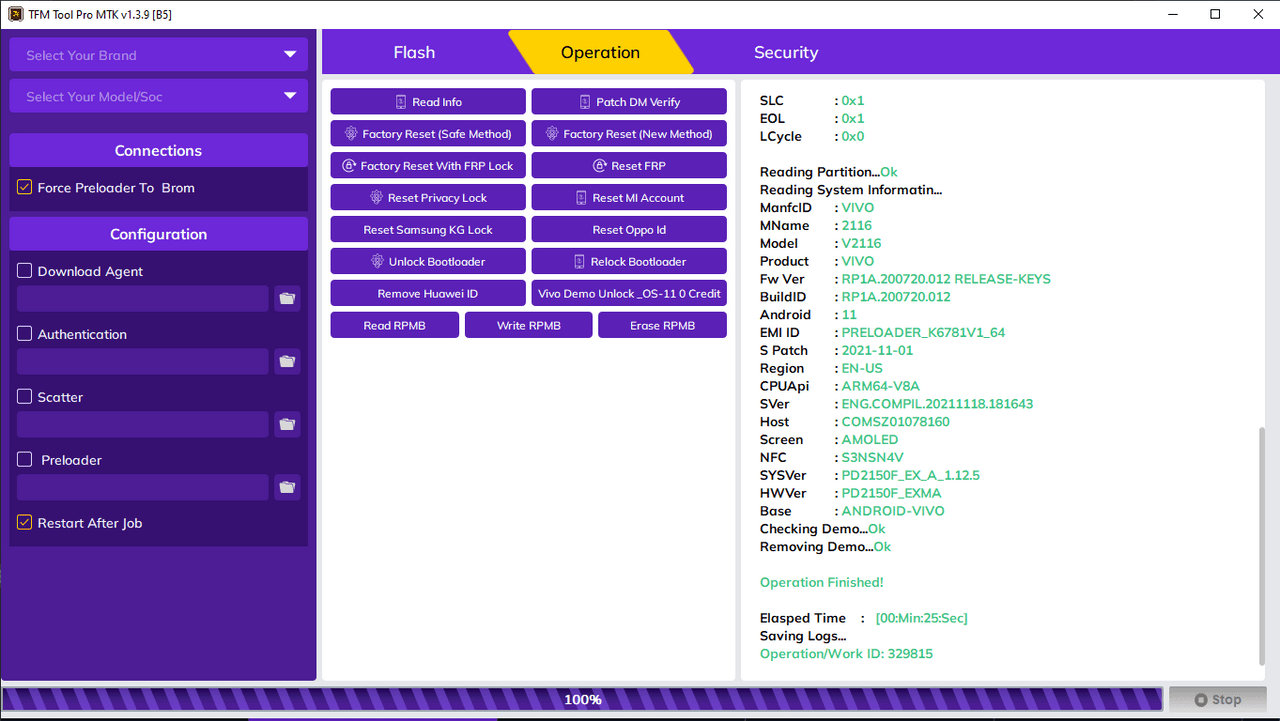
TFM Tool Pro is a powerful Windows program that helps you with unlocking your smartphone and other repairing tasks. Its main goal is to enable users to regain control of their mobile phone, however it also gives you the ability to fix various critical issues with your device. For example, you can flash the embedded firmware.
General notes
When it comes to mobile phone repair tools for major chipset families like MediaTek, Qualcomm, Spreadtrum, then you might have stumbled upon Halabtech Tool. But there are a few utilities such as TFM Tool Pro that offer the similar capabilities, including the following:
- FRP bypass;
- full firmware flash;
- wiping data and partition;
- repair IMEI;
- unlock network;
- bootloader unlocking;
- Mi account bypass.
Compatibility
This is a professional software for unlocking, repairing, and servicing that can be installed on the Windows system. This utility can run on both 32 and 64-bit versions of the Microsoft operating system. Apart from flashing and unlocking, it can also perform some other useful tasks to devices like rebooting to factory or meta mode. The overall process is simple enough that even beginners will be able to operate a complex task without any outside support.
Features
- free to download and use;
- compatible with modern Windows versions;
- gives you the ability to unlock your mobile device;
- you can wipe data and partition storage;
- it is possible to reboot to factory mode;
- requires registration of an account;
- allows you to repair IMEI.
30,4 Mb (downloads: 1601)


