
Using this software you can interact with portable Gigabeat MP3 players manufactured by Toshiba. It is possible to transfer music from the computer to the device.

gigabeat room
ver. 3.0
(downloads: 53)
Update date:
16.05.2023
Developer:
Toshiba Corporation
Windows version:
Windows XP, Windows Vista, Windows 7, Windows 8, Windows 8.1, Windows 10, Windows 11
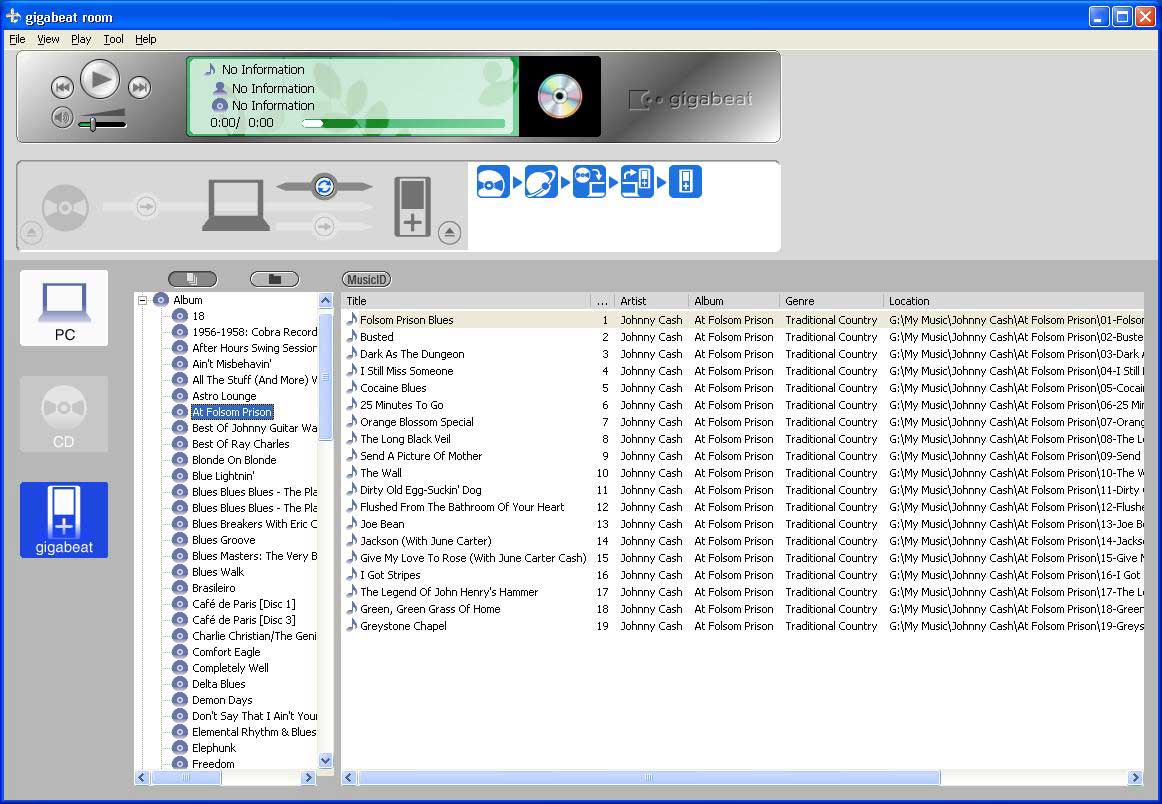
gigabeat room is a Windows utility for connecting to Toshiba Gigabeat MP3 players. It allows users to copy audio tracks to the internal device memory, create custom playlists and organize the music library. Please note that gigabeat room is discontinued and no longer supported by the developer. The installation files are not available.
How it works
Similar to Winamp, the main interface contains standard playback controls and the music collection. You can sort the playlist by title, artist, album, genre, location, bitrate and other attributes.
On first startup the program will automatically scan the hard drive and import all detected audio tracks into the library. After that users are instructed to connect the player to the computer via USB cable and transfer music to the device by clicking the corresponding button.
Additional instruments
You can create and edit playlists. There is a flexible multiband equalizer for adjusting individual frequencies. Moreover, it is possible to edit ID3 tags for easier navigation.
This application allows users to copy the contents of any Audio CD to the MP3 player. All tracks are automatically converted to the compatible file format.
Features
- free to download and use;
- provides tools for creating and managing a music collection;
- you can transfer audio tracks to portable Toshiba MP3 players;
- there is a sound equalizer for adjusting separate frequencies;
- compatible with all modern versions of Windows.
(downloads: 53)


