
This utility is intended for removing the Digital Rights Management protection from various media files. There is support for several common audio and video formats.

Automate unDRM
ver. 2.0
(downloads: 57)
Update date:
03.03.2023
Developer:
undrm.info
Windows version:
Windows XP, Windows Vista, Windows 7, Windows 8, Windows 8.1, Windows 10, Windows 11
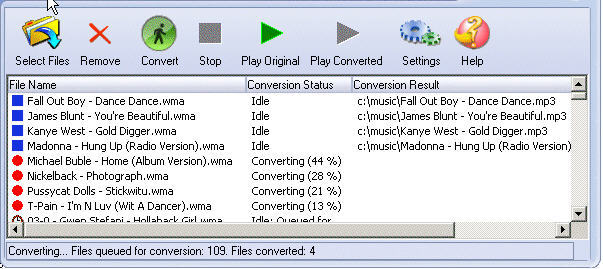
Automate unDRM is a Windows software that allows you to remove the DRM protection from legally purchased music tracks and movies. It is necessary to have valid license files on the hard drive to perform the operation. Please note that Automate unDRM is discontinued and no longer supported by its developer. The installation files are not available.
Main purpose
With the help of this program users can transfer purchased songs and videos to an iPod, Sony PSP or other mobile devices. Original content is not converted in the process. Instead, the included drmbg and drm2wmv modules remove DRM headers from the beginning of every protected file. The source quality is preserved.
It is important to mention that the application works only on systems with Windows Media Player 9 or 10.
Removal process
After starting the utility you are instructed to add new media files to the list by dragging and dropping them into the workspace. Alternatively, there is a button for importing songs and movies.
Users can sort the list by name, conversion status and other attributes. Moreover, it is possible to open original files in the default media player. The Convert button starts the main operation.
Features
- free to download and use;
- provides instruments for removing the DRM protection from legally purchased media files;
- requires Windows Media Player 9 or 10 for the correct functioning of all features;
- the conversion is lossless;
- compatible with all modern versions of Windows.
(downloads: 57)


