
This tool is designed for laptops with a smart battery or a serial memory device. The main purpose of the utility is to repair and recondition laptop accumulators.

AccPlus
ver. 1.3
0,8 Mb (downloads: 68)
Update date:
04.08.2022
Developer:
Microsys Com Ltd.
Windows version:
Windows XP, Windows Vista, Windows 7, Windows 8, Windows 8.1, Windows 10
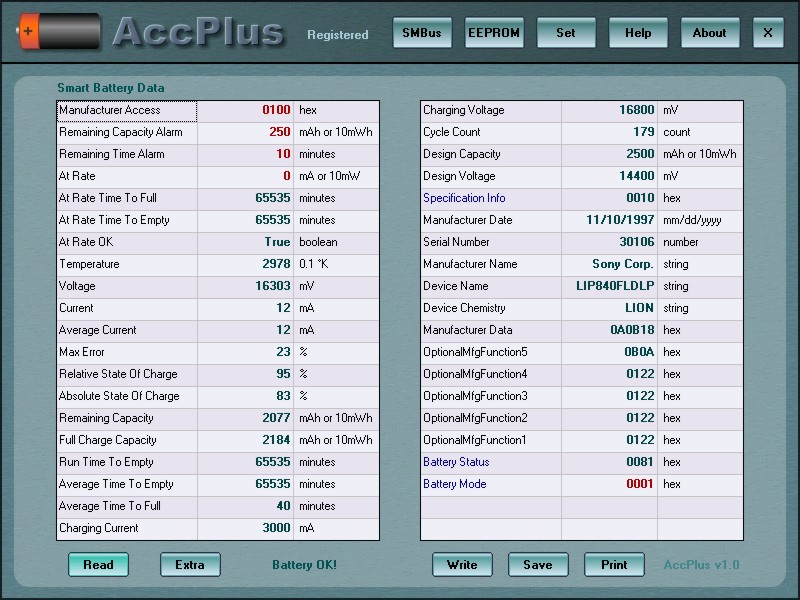
AccPlus is a Windows utility that can be helpful for repairing and restoring laptop batteries. It is intended to be used only by professional technicians.
Smart battery
Almost every modern laptop is equipped with a smart battery pack. It has a controller that can measure voltage and current flowing through the device as well as calculate the charge parameters. This software in its turn, lets users get access to the charging microcontroller.
Accessing the battery data
Before repairing a laptop it is advisable to backup all the important data on it. To do so users can utilize applications like Dell Backup and Recovery Manager or Veeam Endpoint Backup.
With the help of AccPlus it is possible to view the Smart Battery data and reset its integrated memory chip to the initial factory values.
There are options to connect via the PC serial port or the Philips Parallel Port Adapter. The implementation of I2C and Microwire protocols lets you work with both 8 and 16 bit serial memories.
It is worth mentioning that repairing Li-Ion batteries is a dangerous task that must only be performed by trained professionals in a prepared work environment. Inexperienced users can start a fire or harm themselves.
Please note that AccPlus is not available for download. There have not been updates for a while and the developers are no longer supporting the software.
Features
- offers tools for viewing the Smart Battery data on laptops;
- free to use and download;
- works with modern versions of Windows;
- can be connected through the PC serial port;
- can access both 8 and 16 bit memories.
0,8 Mb (downloads: 68)


